
A Kindle Comic Converter alternative, without the 1 GB of extras
Kindle Comic Converter (KCC) is a great open source tool, but making Kindle files with it means installing Amazon's Kindle Previewer, about 1 GB, just to get KindleGen. ComicsFit writes AZW3 files itself, in a 4 MB native app for macOS, Windows and Linux.
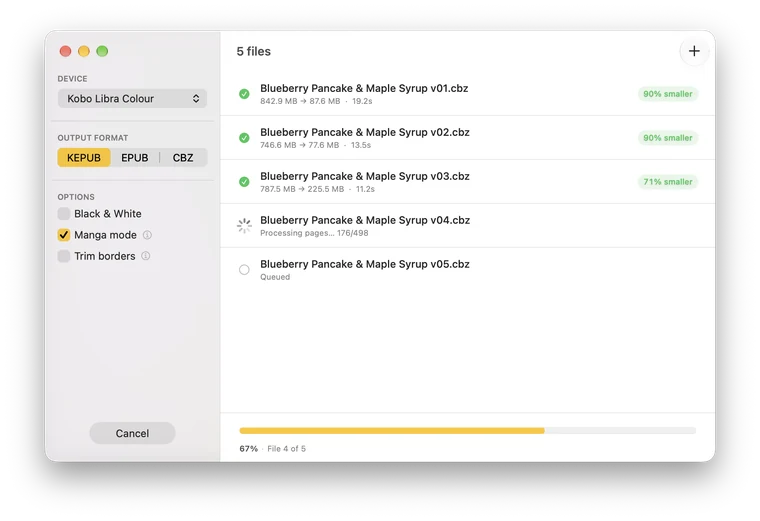
ComicsFit vs Kindle Comic Converter
| ComicsFit | Kindle Comic Converter | |
|---|---|---|
| Kindle files (AZW3) | Built in, nothing else to install | Needs kindlegen from Amazon's Kindle Previewer (about 1 GB) |
| Download | About 4 MB, one app | KCC, plus Kindle Previewer for Kindle output |
| Interface | Native: SwiftUI on macOS, GTK4/Adwaita on Linux, WPF on Windows | The same Qt interface on every system |
| Input | CBZ, CBR, EPUB, KEPUB | CBZ, CBR, CB7, PDF, image folders and more |
| Output | AZW3, KEPUB, EPUB, CBZ, PDF | MOBI/AZW3, EPUB, KEPUB, CBZ, PDF |
| Device presets | Current Kindle, Kobo and reMarkable models, or a custom resolution | Long list, including many older Kindles and Kobos |
| Manga (right to left) | Yes | Yes |
| Options | A few, with good defaults: Manga mode, Trim borders, Black & White | Many: spread splitting, upscaling, gamma, webtoon mode, Panel View… |
| Command line | No | Yes |
| Price | Free one file at a time, €9 once for batch | Free and open source |
What ComicsFit does differently
- No Kindle Previewer Amazon stopped shipping KindleGen on its own, so KCC has to borrow it from Kindle Previewer, about 1 GB. ComicsFit has its own AZW3 writer: convert CBZ to AZW3 with nothing else installed.
- Native on every system A real Mac app, a real GNOME app and a real Windows app, sharing one fast Rust engine. About 4 MB to download, no Python or Qt runtime.
- Fewer settings to get right Pick your device, pick a format, click Convert. ComicsFit shows only the formats that work on your device and selects the best one.
- Kobo and reMarkable too KEPUB for Kobo and PDF sized to the screen for reMarkable.
When KCC is the better choice
KCC has been around for years and has options ComicsFit doesn't: splitting double-page spreads into two pages, upscaling small scans, gamma correction, webtoon mode, Kindle Panel View, a command-line tool and support for older devices and more input formats. It is also free and open source for everything, batch included.
If you need those options, or already have Kindle Previewer installed, KCC is a fine tool. If you want a small, native app that turns your comics into the right file for your e-reader in a few clicks, try ComicsFit: it's free to use one file at a time.
Coming from KCC
- Download ComicsFit and open it. You can uninstall Kindle Previewer if you only had it for KCC.
- Drop your .cbz, .cbr or .epub files into the window.
- Pick your device: the resolution is set for you, like KCC's device profiles.
- Choose the output format (AZW3 for Kindle, KEPUB for Kobo, PDF for reMarkable). Turn on Manga mode for right-to-left reading.
- Click Convert.
Questions
Is ComicsFit a fork of Kindle Comic Converter?
No. ComicsFit is a separate app with its own Rust engine. It follows some of KCC's proven choices, like how double-page spreads are detected, but it shares no code with it.
Do I need Kindle Previewer or KindleGen to make Kindle files?
Not with ComicsFit. It writes AZW3 files itself, so there is no Amazon software to install. KCC relies on kindlegen, which now only ships inside Kindle Previewer, a download of about 1 GB.
Is Kindle Comic Converter free?
Yes, KCC is free and open source. ComicsFit is free too for one file at a time, with every format and device. A one-time €9 license adds the batch queue for whole collections.
Does ComicsFit read manga right to left like KCC?
Yes. Turn on Manga mode and AZW3 (Kindle) and KEPUB (Kobo) files open right to left.
Does ComicsFit work on Mac with Apple Silicon?
Yes. The macOS app is native SwiftUI built for Apple Silicon, with no Python or Qt runtime.
Download ComicsFit
Free to use. 4 MB. No account needed.
Windows on ARM? Download for ARM64
macOS (Apple Silicon) · Linux GTK4/Adwaita · Windows 10/11 (x64 and ARM64)
Windows needs the .NET Desktop Runtime 10 or later. If it is missing, Windows offers to download it when you open ComicsFit.
⚠️ macOS security warning: ComicsFit is not yet notarized by Apple. On first launch, right-click the app → Open, then click Open in the dialog. If macOS blocks it, go to System Settings → Privacy & Security and click "Open Anyway". You only need to do this once.