
Reduce CBZ file size
Comic scans are often two or three times larger than an e-reader screen. ComicsFit resizes every page to your device's exact resolution and recompresses it: files commonly shrink by 50 to 90%, with no visible difference on the device.
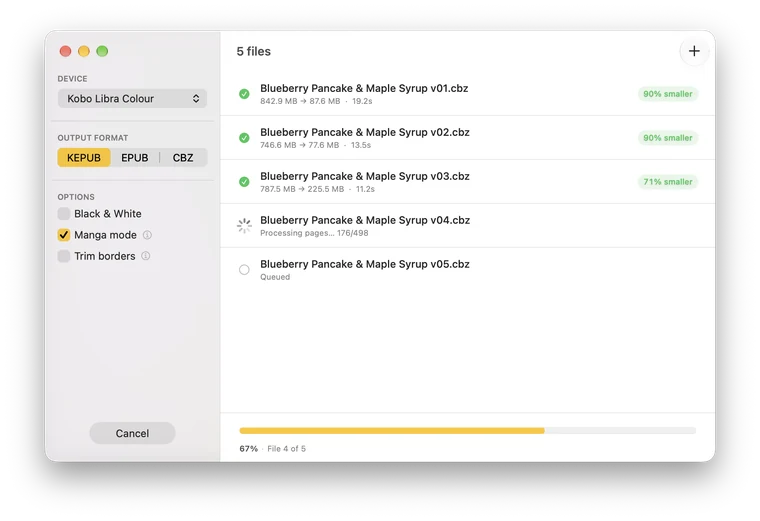
Compress comics in five steps
- Download ComicsFit for macOS, Windows or Linux and open it.
- Drop your .cbz, .cbr or .epub files into the window.
- Select your e-reader, or set a custom resolution for a tablet or phone.
- Pick an output format. Keep CBZ (choose a Kobo or Custom device) if you just want a smaller CBZ.
- Click Convert. ComicsFit shows how much space you saved.
Three ways to smaller comics
- Resize to the screen The biggest win. A 3000 pixel tall scan shown on a 1680 pixel screen wastes most of its pixels. ComicsFit never upscales: smaller pages stay as they are.
- Black & White On a grayscale e-reader, color data is wasted. Converting to grayscale cuts the size further.
- Trim borders Removes empty margins, so the art takes the whole screen instead of white space.
Download ComicsFit
Free to use. 4 MB. No account needed.
Windows on ARM? Download for ARM64
macOS (Apple Silicon) · Linux GTK4/Adwaita · Windows 10/11 (x64 and ARM64)
Windows needs the .NET Desktop Runtime 10 or later. If it is missing, Windows offers to download it when you open ComicsFit.
⚠️ macOS security warning: ComicsFit is not yet notarized by Apple. On first launch, right-click the app → Open, then click Open in the dialog. If macOS blocks it, go to System Settings → Privacy & Security and click "Open Anyway". You only need to do this once.